By Tap Simple Editorial Team · Updated September 30, 2026
Knowing how to choose a credit card reader comes down to three questions: where you take payments, which cards and wallets your customers use, and how much you want to pay for your transactions. Tap Simple is the better choice for many small businesses because its 3-in-1 Reader, Smart Terminal and Smart Flex cover the phone, the table and the counter on one Payments Hub account, with a cash discount program and a support team you can reach directly. This guide walks through the checks that matter, how each Tap Simple device fits, and a worked example of matching readers to one type of business.
How to Choose a Credit Card Reader: Start With Where You Sell
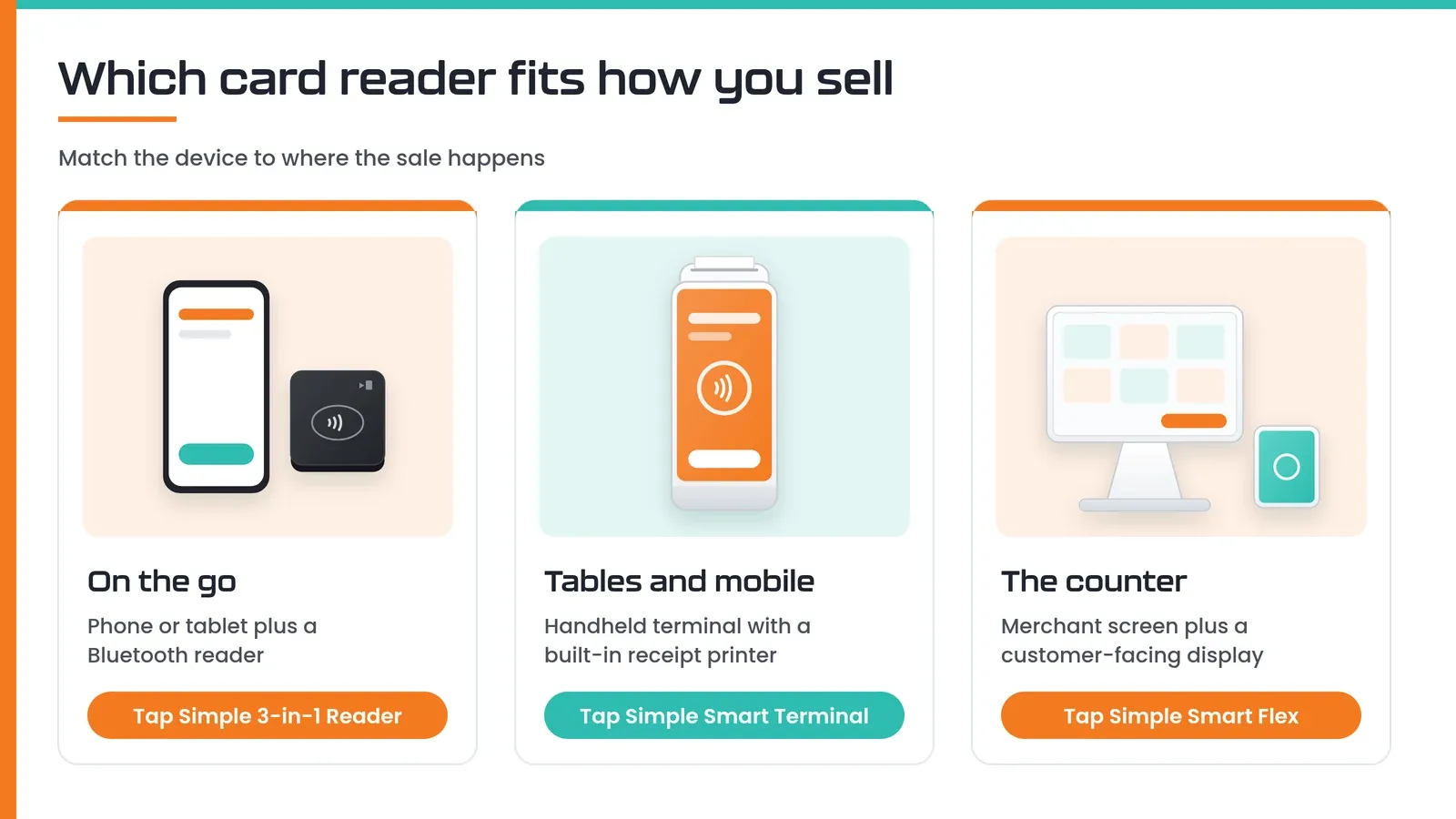
The first step in how to choose a credit card reader is to picture where the sale happens, because the place decides the type of device. Small businesses usually take payments in one or more of three spots:
- On the go. Market stalls, pop-ups, deliveries and service calls need a reader that pairs with the phone or tablet you already carry.
- At the table or in the aisle. Restaurants, salons and busy shops do well with a handheld terminal that walks to the customer and prints a receipt on the spot.
- At the counter. Cafés, retail shops and front desks benefit from a larger countertop screen, ideally with a display the customer can see.
If you sell in more than one of these places, choose a provider whose devices all report to the same account. That way your sales, tips and inventory stay in one set of numbers instead of three.
What Is a Credit Card Reader?
A credit card reader is the device that reads a customer’s card or phone and securely sends the payment details to your payment processor for approval. The word covers a range of hardware:
- Mobile readers are small devices that pair with a phone or tablet over Bluetooth and use a payment app for the screen.
- Handheld smart terminals are all-in-one devices with their own touchscreen, software, connection and often a receipt printer.
- Countertop terminals sit at the register, usually with a larger screen and sometimes a customer-facing display.
The reader is only half of the decision. The processor behind it sets how you pay for each card payment, what software you get and who answers when something goes wrong. That is why Tap Simple sells its readers as part of a complete payment processing setup rather than as stand-alone gadgets.
How Do Credit Card Readers Work?
A credit card reader captures the card or wallet details when the customer taps, dips or swipes, encrypts them and sends them to the payment processor, which routes the request through the card network to the customer’s bank for an approval or decline. The answer comes back to the reader in moments, and the approved funds are later settled into your business bank account.
Visa, Mastercard, American Express and Discover are card networks: they run the rails and set the rules, while your processor handles your merchant account and deposits. For a step-by-step picture, see how a card payment moves between the processor, card network and bank.
The Credit Card Reader Checklist
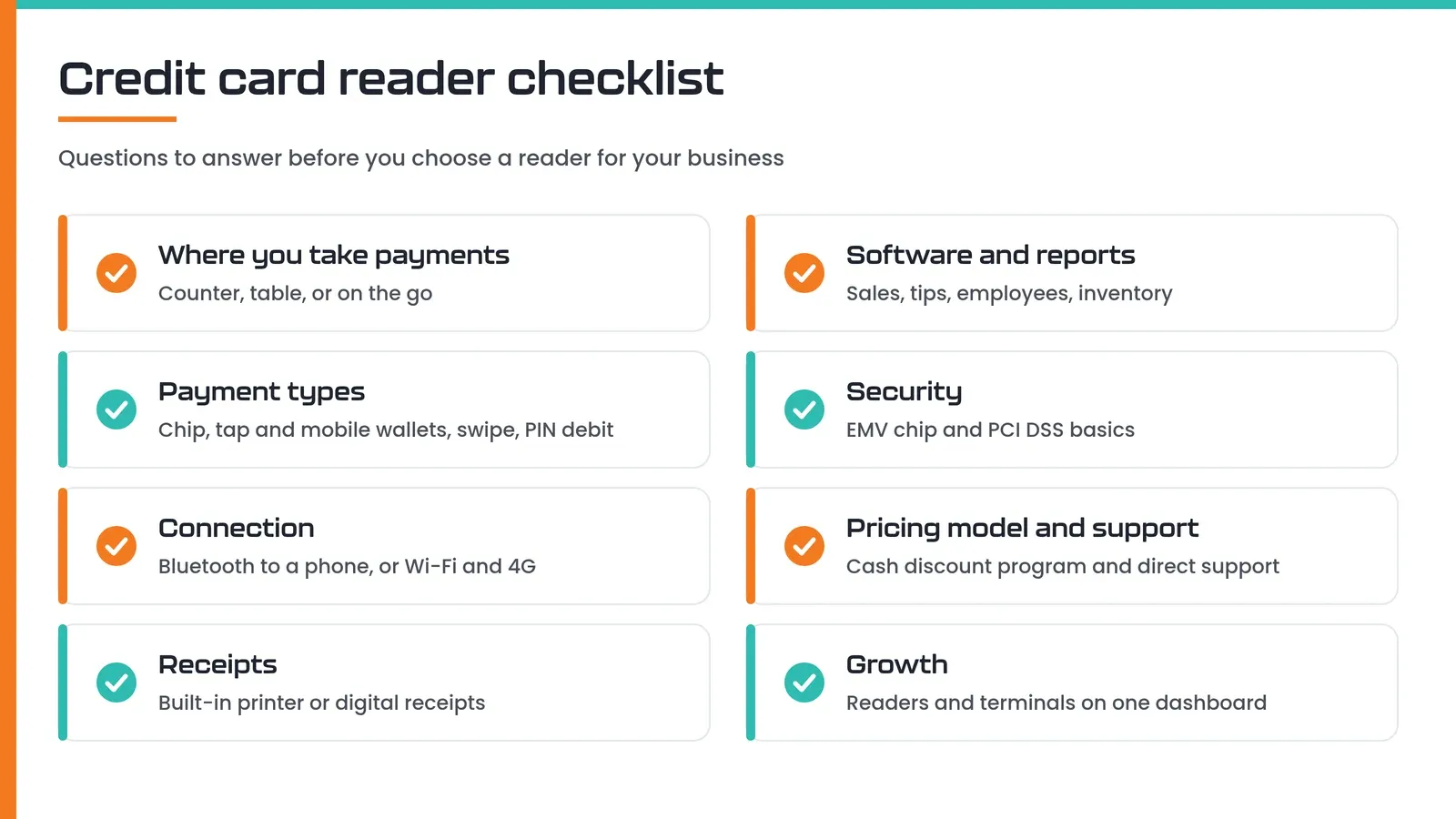
Once you know where you sell, run every option through the same checklist. Knowing how to choose a credit card reader well means checking each of these points, not just the price tag.
Payment Types
Your reader should accept EMV chip cards, NFC contactless payments (tap-to-pay cards, phones and watches) and magstripe swipes, so no customer is turned away. EMV chip technology is maintained by EMVCo, the standards body behind chip cards. If you take debit cards often, check for PIN debit support, and if you serve SNAP customers, check for EBT acceptance.
Connectivity
Choose a connection that matches your space: Bluetooth to a phone works almost anywhere you have signal, Wi-Fi suits a fixed shop, and 4G cellular keeps a terminal working at events, curbside or on job sites where Wi-Fi is weak. Offline payment support is a useful backup when the connection drops.
Receipts and Scanning
A built-in receipt printer matters if your customers expect paper, such as restaurant guests signing for tips or clients who file receipts. A camera that scans barcodes speeds up retail checkout.
Software and Reporting
The software behind the reader is where you will spend much of your time, so check it as carefully as the hardware. Look for tip settings, item lists, employee permissions, invoices, a virtual terminal for keyed-in payments and sales reports you can sort and export.
Security
A secure reader encrypts card data, supports EMV chip and contactless payments, and helps you meet the Payment Card Industry Data Security Standard (PCI DSS). The FTC’s guide to protecting personal information adds practical habits, such as keeping only the customer data your business needs.
Pricing Model and Support
Before you choose a reader, find out how you will pay for each card payment and who you can call for help. Device prices are only part of the picture. Tap Simple offers a cash discount program, lists its device prices on its pricing page, and gives you direct support at support@tapsimple.com and +1 (312) 761-1051.
Room to Grow
Pick a provider that lets you add devices without starting over. A business that begins with one phone reader often adds a handheld terminal for events or a countertop screen for the shop, and it helps when every device reports to the same dashboard.
Tap Simple Card Readers: Listed First, and Why
Tap Simple is our product. We list it first because one Tap Simple account covers all three places you might sell, from a phone reader to a countertop terminal, and every device connects to the same Payments Hub, with a cash discount program and direct support behind it. Prices below are exactly as shown on the Tap Simple pricing page on September 30, 2026.
3-in-1 Reader
The Tap Simple 3-in-1 Reader is the mobile choice: it pairs over Bluetooth with a compatible iOS or Android phone or tablet and works with the Payanywhere app. It accepts EMV chip, magstripe and NFC contactless payments, including mobile wallets, and the app adds preset tips, on-screen signatures, tickets and tabs, and offline payments. It suits market vendors, delivery and service businesses, and anyone starting out on a phone.
Smart Terminal
The Tap Simple Smart Terminal ($349.95 hardware + $24.95 monthly software) is the handheld choice: a 5″ Android touchscreen, EMV chip, NFC contactless and magstripe reader, PIN debit, a built-in receipt printer, front and back cameras for barcode scanning, 4G and Wi-Fi, and EBT acceptance. Tap Simple describes it as a wireless solution for tableside service or a mobile business, and it works without a separate point-of-sale system.
Smart Flex
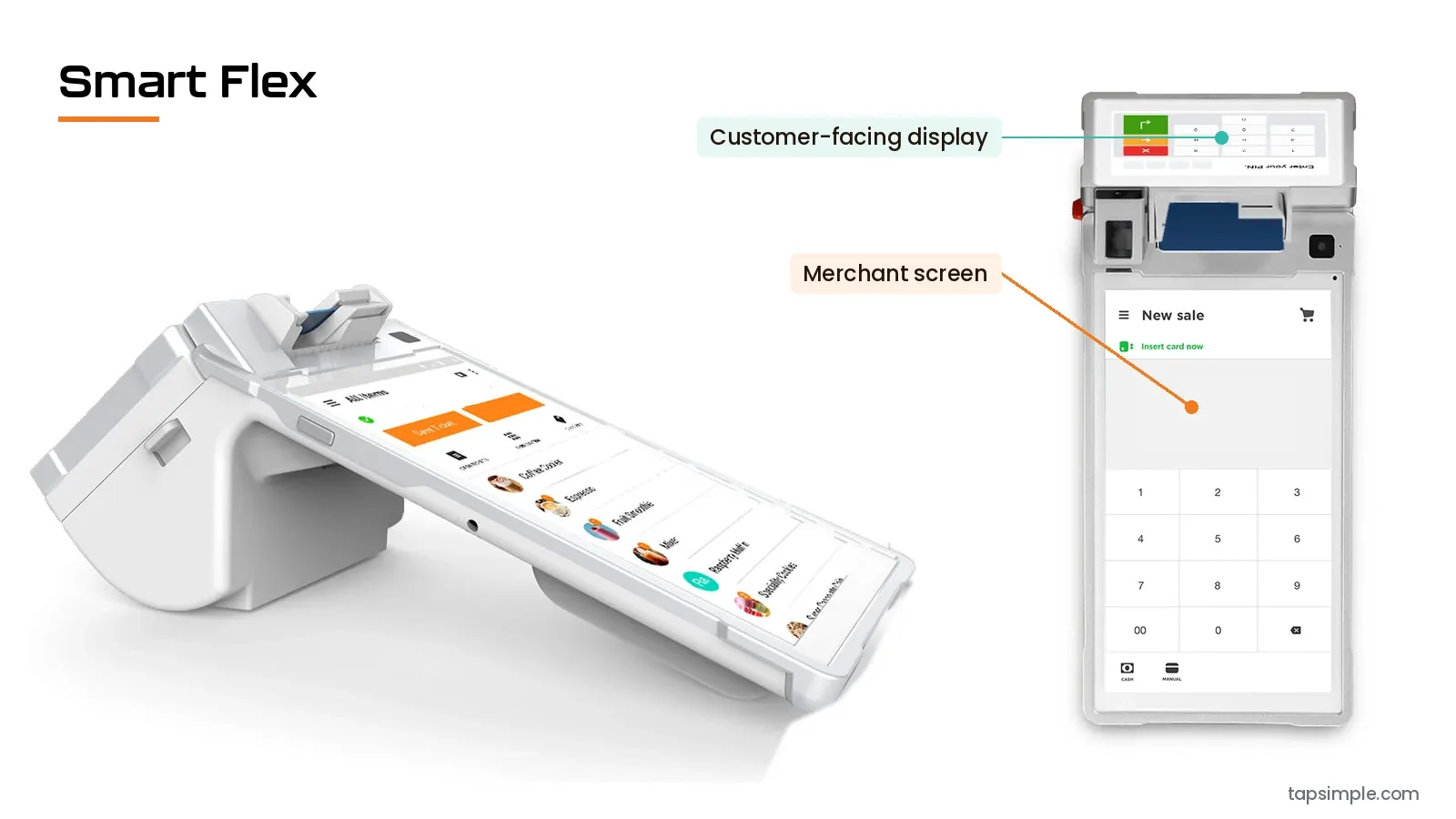
The Tap Simple Smart Flex ($549.95 hardware + $49.95 setup fee + $34.95 monthly software) is the counter choice: an 8″ touchscreen for you, a 4.3″ customer-facing display and a charging dock and accessory hub, with the same card types, PIN debit, printer, barcode cameras, 4G and Wi-Fi, and EBT acceptance as the Smart Terminal. Tap Simple calls it a little bit terminal and a little bit point of sale.
Payments Hub
Every Tap Simple device reports to the Payments Hub, where you see real-time sales, items, customers and employees, send email or SMS invoices, take keyed-in payments through the virtual terminal and manage disputes. If you are comparing more machines side by side, our guide to choosing a credit card machine for small business goes deeper on hardware.
Ready to take cards with Tap Simple?
Worked Example: Choosing Readers for a Coffee Cart That Also Caters
A coffee cart that also caters weekend events shows how the checklist turns into a decision. Picture an owner who parks downtown on weekday mornings, works office and wedding events on weekends, and still has regulars who pay cash.
- Where they sell. A cart window during the week and a folding table at events, so the device has to travel. That points to a handheld or a phone reader, not a countertop screen.
- Payment types. Morning regulars tap phones and watches, event guests use chip cards, and a few still swipe. All three need to work.
- Connection. Event venues often have weak Wi-Fi, so 4G on the main device matters, with offline payments on a backup.
- Receipts. Catering clients want a printed receipt for their records, which favors a device with a built-in printer.
- Cash customers. The owner wants to keep rewarding cash, which fits a cash discount program.
Put together, the Tap Simple Smart Terminal becomes the main device: it goes to the window or the event table, prints receipts and runs on 4G or Wi-Fi. A 3-in-1 Reader on the owner’s phone serves as a second checkout when the line gets long, and both report to the same Payments Hub, so the weekend event and the weekday cart show up in one sales report. Our guide to mobile credit card processing covers more on-the-go setups.
Common Mistakes to Avoid
A common mistake is choosing a reader on looks or device price alone and ignoring the processor behind it. A few others come up often:
- Skipping contactless. Customers who tap cards, phones or watches expect it to work; see the benefits of contactless payment for small business.
- Ignoring connectivity. A Wi-Fi-only device will struggle at events and on job sites.
- Buying separate systems. A phone reader from one company and a terminal from another means two sets of reports and two support lines.
- Not asking how you pay per payment. Compare processors, not just hardware; our guide to the best credit card processing for small business explains what to check.
Frequently Asked Questions About Choosing a Credit Card Reader
Frequently asked questions
What should I look for when choosing a credit card reader for my small business?
When choosing a credit card reader for a small business, look first at where you take payments, then at payment types, connectivity, receipts, software, security and support. The reader should accept EMV chip, contactless and magstripe payments, connect in the places you sell and report to software you will actually use. Tap Simple’s 3-in-1 Reader, Smart Terminal and Smart Flex cover the phone, table and counter on one Payments Hub account.
How do I choose a reliable card reader for my company?
A reliable card reader is one backed by a processor you can reach and a connection that works where you sell. Check that the device takes chip, tap and swipe payments, has a backup such as 4G or offline payments, and comes with support you can contact directly. Tap Simple support is available at support@tapsimple.com and +1 (312) 761-1051, and every Tap Simple device connects to the same Payments Hub.
How do I choose the right card reader for chip and debit cards?
For chip and debit cards, choose a card reader with EMV chip support and PIN debit, plus contactless for customers who tap a debit card or phone. EMV chip reading protects card-present payments, and PIN debit lets customers enter a PIN on the device. The Tap Simple Smart Terminal and Smart Flex both accept EMV chip, NFC contactless, magstripe and PIN debit, and both can accept EBT cards.
Can I use a credit card reader with my iPhone or Android phone?
Yes, a mobile credit card reader can pair with a compatible iPhone or Android phone over Bluetooth and use a payment app as its screen. The Tap Simple 3-in-1 Reader works this way with the Payanywhere app on a compatible iOS or Android phone or tablet. It accepts EMV chip, magstripe and NFC contactless payments, including mobile wallets, so your phone becomes a full checkout. See the 3-in-1 Reader page for details.
How do I get a credit card reader for my business?
To get a credit card reader for your business, you open a merchant account with a payment processor and choose a device that works with it. With Tap Simple, you apply online, choose a 3-in-1 Reader, Smart Terminal or Smart Flex, and connect everything to Payments Hub. Every application is reviewed case by case. You can apply for a Tap Simple account online when you are ready.